
A Note on User Management
Materia has three distinct methods for user authentication:
- Local user accounts. These are primarily intended for service users, such as a superuser account. Materia does not offer a user management solution to create and manage local accounts at scale.
- External authentication. This involves the authoring of a dedicated Django app to facilitate external auth, such as SAML. We do not provide an out-of-the-box external authentication solution.
- Authentication through the LMS. This is the easiest and most out-of-the-box authentication method for institutions. Using LTI 1.3, Materia defers user management to the LMS, and provisions local user records based on the information provided in the LTI payload.
You can continue to create and administer local-to-Materia users (such as service accounts) alongside user records created through external authentication methods.
Configuring LMS Authentication
Consult the Canvas LTI Setup page to integrate Materia with your instance of Canvas. Take special note of the LTI_PAYLOAD_USER_IDENTIFIER environment variable mentioned on the Server Configuration page. This value becomes the username field of Materia user records.
Service Users
Creation of service users is best performed through the Django administration interface.
Regardless of your authentication configuration, service users can always access the built-in Materia login page by visiting /login?directlogin=1. Doing so bypasses login restrictions such as those imposed by the RESTRICT_LOGINS_TO_LAUNCHES configuration.
Granting Roles
Role Provisioning With LTI
Materia intelligently manages user roles during LTI authentication. Roles are inferred from the contents of the LTI payload. These roles are defined in the lti.py settings file:
LTI_COURSE_ROLES = {
    "staff": [
        "http://purl.imsglobal.org/vocab/lis/v2/membership#Instructor",
        "http://purl.imsglobal.org/vocab/lis/v2/membership/Instructor#TeachingAssistant",
        "http://purl.imsglobal.org/vocab/lis/v2/membership#ContentDeveloper",
    ],
    "student": [
        "http://purl.imsglobal.org/vocab/lis/v2/membership#Learner",
    ],
}

LTI_INSTITUTION_ROLES = {
    "staff": [
        "http://purl.imsglobal.org/vocab/lis/v2/institution/person#Administrator",
        "http://purl.imsglobal.org/vocab/lis/v2/institution/person#Instructor",
    ],
    "student": [
        "http://purl.imsglobal.org/vocab/lis/v2/institution/person#Student",
    ],
}
Note that Materia relies on course and institutional roles in different contexts. The basic_author role is applied based on a user’s institutional role in the LTI payload. However, when interacting with Materia in LTI contexts, the course role is used to determine what content to render. For example, if a widget embedded as an assignment is visited by an institutional staff member who is a student in the current course, the widget will render appropriate to the user’s course role as a student.
Service User Role Management
With Materia v11, service user roles are now primarily managed via Django user groups:
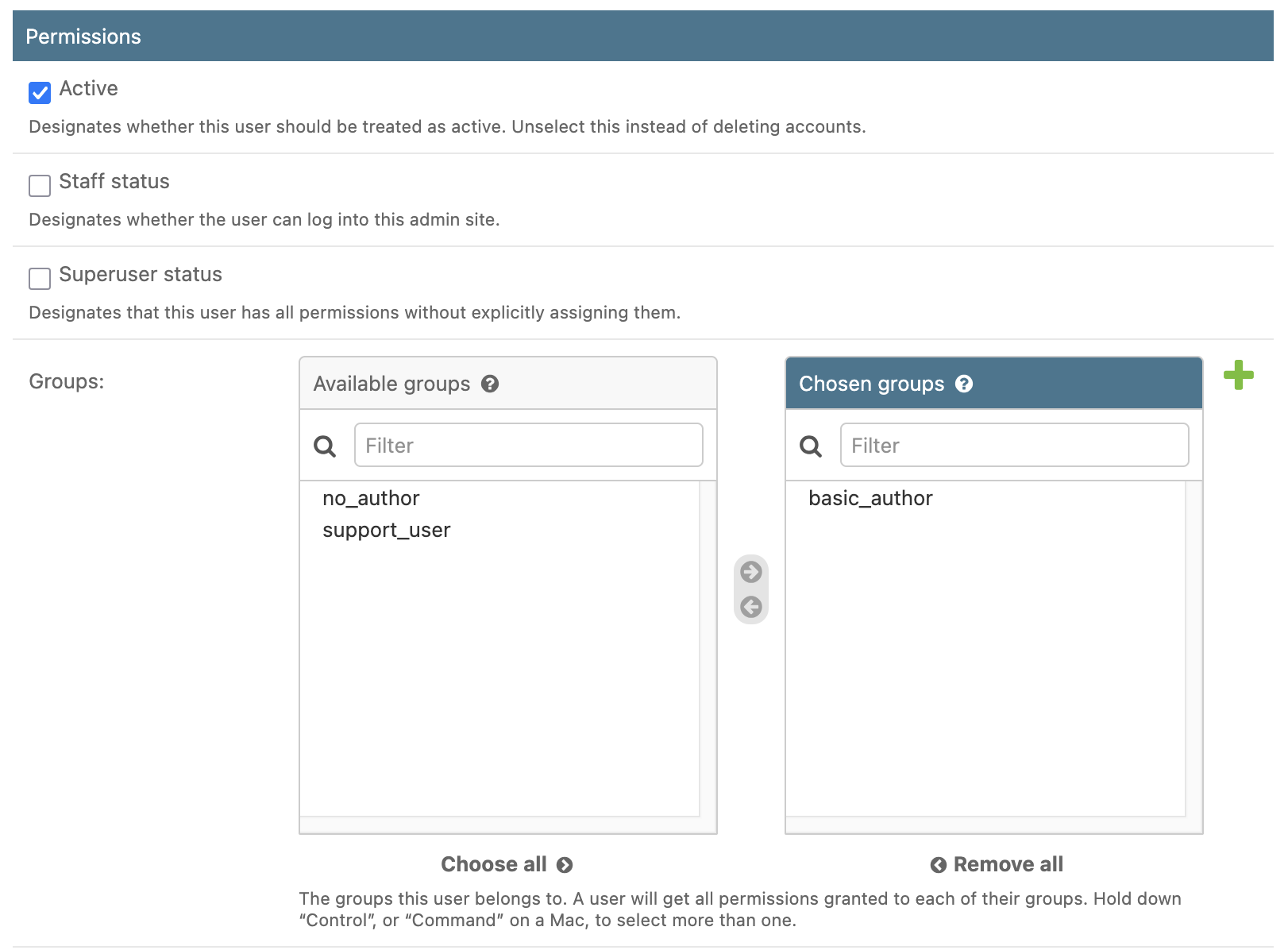
The three user groups available are:
basic_author: intended for faculty and staff and represents normal access.support_user: provides elevated access for support staff. It must be provisioned (and revoked) manually. Support users can provide certain administrative actions for users and instances, and can view student performance data for any instance.no_author: prevents the user from authoring widgets. This role should not normally be granted to regular users.
The super_user role is now determined by the superuser flag in Django. This is separate from user groups. Select “Superuser status” to grant a user the superuser role.
Note that the “Staff status” flag in Django does not grant any Materia-specific authority.