
About Widget Gradebook Sync
When properly embedded in your LMS as an activity with an associated record in the gradebook - such as an assignment - Materia will sync your score to the gradebook automatically.
To learn more about how to embed widgets in a manner that enables gradebook sync, refer to the Embedding Widgets in Canvas page.
What Materia Sends the LMS
Materia only ever sends a score percentage to the LMS - the point value of the activity and how it is displayed is dictated by the LMS in the activity’s settings. For example, if an assignment is worth 10 points and the student receives a 50% score at the conclusion of a widget play session, the gradebook will indicate 5/10 points.
For a given course context, Materia will always send the highest score the student received to the gradebook. If a student plays a widget three times and receives a 100%, 80%, and 50% scores in that order, all three gradebook submissions will be 100%.
Attempt Limits: Canvas vs Materia
It’s important to remember that while both Canvas and Materia possess attempt limits, they are distinct from one another and are not communicated to each other.
For example, a widget with 2 attempts is embedded in an assignment with 1 submission attempt. A student would experience the following:
- The student can play the widget once through to completion, and their score will be synced to the gradebook for the assignment.
- Materia will display the “Play Again” option at the score screen, enabling the student to play the widget a second time.
- The student completes the widget but is informed the assignment’s attempt limit has been reached and the score was not synced. The Play Again option is no longer visible since the student has reached the attempt limit for the widget in Materia for this particular course context.
Because of this discrepancy, it’s important to ensure that attempt limits are in sync with one another if set on both sides. Alternatively, you may set the limit on one side but not the other. Generally speaking, we advise instructors set attempt limits in Materia exclusively: the student may load the assignment and its embedded content, but Materia will prevent subsequent play sessions (and thus, submissions) once that limit is reached.
Grade Sync Status
Materia reports the status of a play session’s gradebook sync on the score screen at the conclusion of the play, which can also be reviewed at any time by either the student or an instructor with access to the widget:
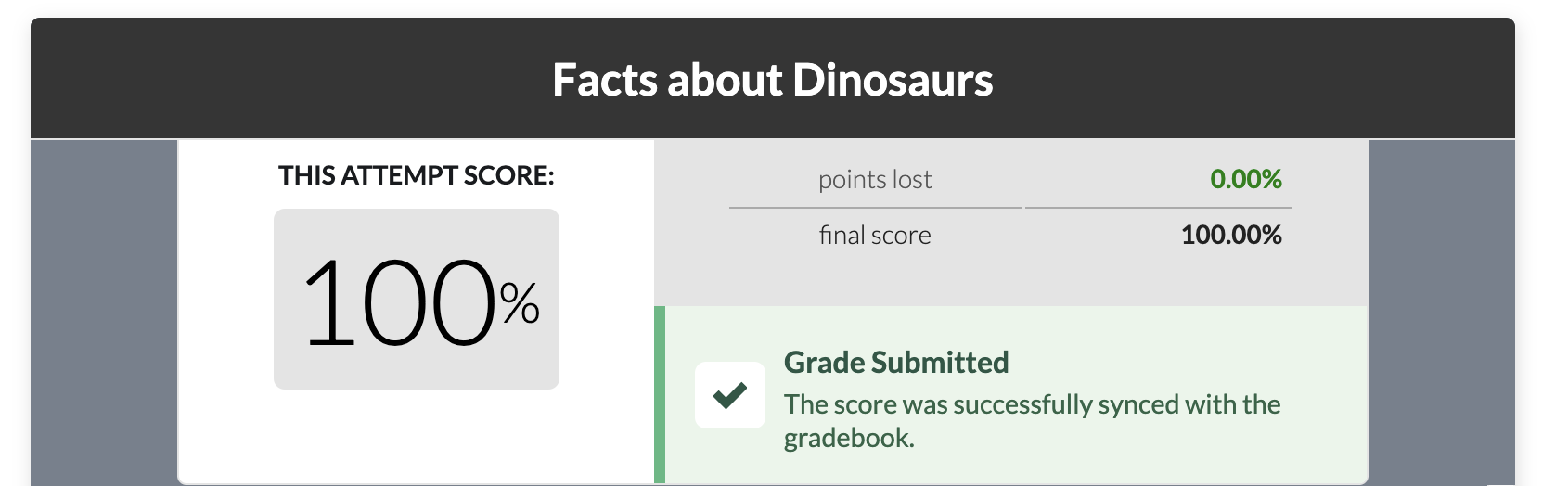
In addition to the successful sync message, the status message may indicate a number of error or failure states:
- No Grade Submission Status: Historical plays (those recorded in earlier versions of Materia) do not have gradebook sync records available. This is not an indicator of a gradebook sync failure; rather, the status of the sync is not known.
- No Grade Submission: Indicated if the widget was embedded in an activity that was not graded or did not support gradebook sync, such as module items.
- Attempt Limit Reached: Indicates that the LMS rejected the submission because the attempt limit for the associated activity has already been reached.
- Submission Error: Indicates there was an error during the submission process. Students are given an opportunity to retry the submission within a certain period of time after the original submission.
Reviewing Student Submissions
At any time, instructors with access to a widget in Materia can review individual score submissions from students in the Student Activity section of the selected widget in My Widgets. The Individual Scores tab will provide a list of all play sessions for a given semester, organized by student.
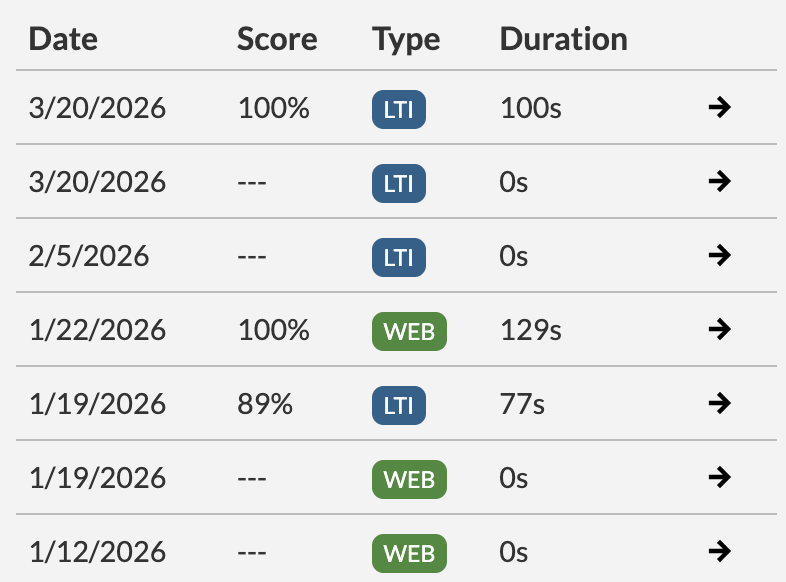
Notably, the “Type” field for each play session indicates whether it was initialized as a course activity that potentially supports gradebook sync (“LTI”) or standalone in Materia (“WEB”). Only plays marked “LTI” are eligible for syncing with the gradebook.
As a widget owner, co-owner, or collaborator, you can review the score screen for a given play session by selecting the arrow button on the right of each row.