
User Management
The user administration interface allows support users to review certain attributes of a Materia user, the instances they own or have access to, as well as their instance play history.
Looking Up Users
Users can be looked up using their name or email address. It’s extremely important to remember that user administration is limited to users within Materia itself. When an instructor or student authenticates with Materia, either through the LMS or via direct login, Materia will verify whether a row in the user table exists with their information. If a row does not exist, Materia will try and create one.
In some rare circumstances, users logging in to Materia for the first time may encounter an error. This is typically due to a collision in email addresses. It may be worth investigating whether the email associated with the user is already in use by another user in Materia.
If a user is part of your institution but does not appear in search results, it is likely they have not interacted with Materia previously. They must authenticate with Materia at least to be eligible for certain actions, like being given access to a widget instance.
User Admin Reference
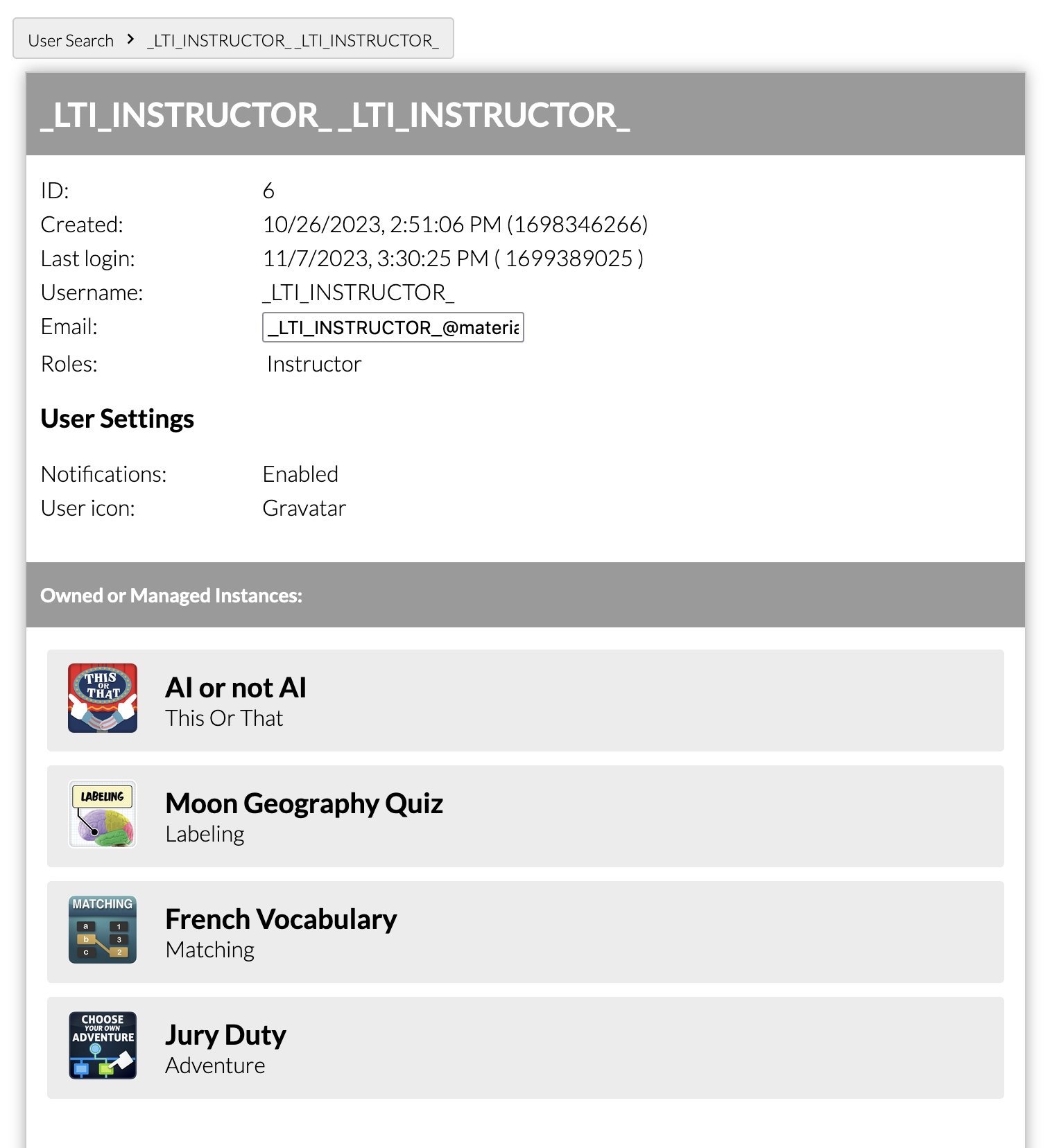
Most of the data available for a user lookup is read-only, and is used for reference purposes. Some notable properties include:
- ID: this integer value is the user’s interal user ID. It is the primary key of the user table and is primarily used for database queries and internal logic.
- Username: this is the interal-to-Materia username. The value is configured by your institution. Unless users are authenticating directly with the Materia login page, this value is not visible nor important to your users.
- Email: Self explanatory. You can modify this value, but be careful to ensure the new email is not already in use.
- Roles: A user’s role determines certain limitations within Materia. Notably, the instructor role has full access to all standard Materia features. The student role is more limited: student-made instances are forced into Guest Mode, and a student cannot be added as a collaborator to a non-student widget instance
- The User Settings section includes the configurable settings available to users on their profile page.
User Instances
This section is populated with every instance the user has access to, either as an owner or a collaborator. Provided with each instance is a list of its properties, as well as the option to manage it directly. This is analogous to looking up the instance in the instance admin page.
Play History
This section details every widget play session initialized by the user:
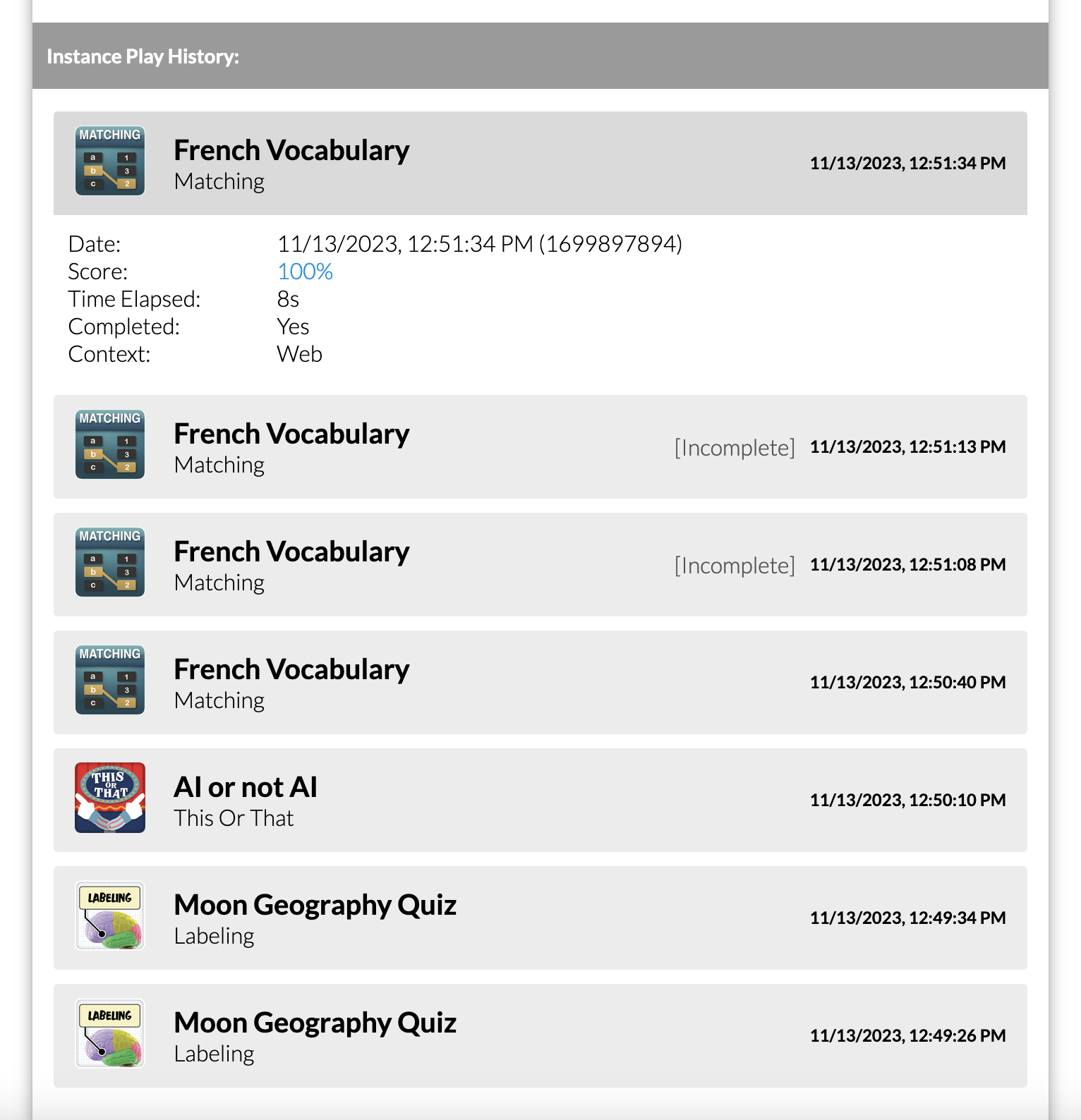
There are a few considerations to keep in mind when reviewing user play history:
-
The Time elapsed value is not to be relied upon for incomplete plays. This is because while some widget engines will transmit logs to the server after every user interaction, many will instead transmit all log data upon submission. The server can extrapolate a play duration for incomplete plays based on the submission time of logs, but if no further logs were transmitted after the play was initialized, the duration will be noted as
1s, which may or may not be the actual duration the student spent on the page before abandoning the play. -
The Context value will be
WeborLTIdepending on where the instance was played. If embedded as an assignment in your LMS, the widget will likely be played in anLTIcontext. LTI-enabled plays typically transmit score data back to the LMS, however they will not transmit score data if embedded as a module item instead of an assignment. -
The Submission Status property indicates the grade passback status of the play session. Note that play sessions from earlier versions of Materia will not have their submission status recorded; these are indicated by a “Legacy” status. Other submission status codes include:
NOT_SUBMITTED: this is the default value. It generally means the play session was not completed.NOT_GRADED: the activity the widget was embedded in was not graded (for example: a module item).SUCCESS: the score was successfully received by the LMS.AGS_NOT_INCLUDED: similar toNOT_GRADED, the activity did not support score submissions.ERR_NO_ATTEMPTS: Materia attempted to submit the score but it was not accepted by the LMS because the activity’s attempt limit was already reached.ERR_FAILURE: indicates a general failure. When this status is present, an option to re-submit the score to the LMS will become available.
As a support user, you have the ability to review the score screen associated with a specific play session. Clicking the score percentage for a play will bring up the score screen associated with that play, allowing you to review how the student responded to individual questions.
Troubleshooting Common Issues
Below are a few examples of common issues related to user management we’ve seen when supporting Materia:
Students claim they completed a widget but the gradebook in their LMS did not update
This was a periodic issue that manifested with our LTI 1.1 integration; it typically occured due to session timeout or destruction due to user behavior. With Materia v11 and the LTI 1.3 integration, the gradebook passback code has been overhauled to better persist launch information and the passback status is reported to the user on the score screen. When in doubt, you can review the user’s play history and view the score screen for a given play session by clicking on the score percentage, which includes the passback status to confirm whether or not the gradebook sync occurred.
Students receive a launch validation failure message
This is typically associated with a malformed or invalid LTI launch, which may be due to user behavior such as using the back button to resubmit form content. The student should revisit the activity from the original page or link from the LMS.