
LTI Integrations
Materia can be embedded into other systems that support the LTI standard for regular or graded external tools. This standard allows Materia to securely authenticate users and pass scores back to the external system.
In Materia v10 and below, the LTI integration was authored to the version 1.1 specification. With Materia v11, the LTI integration has been re-authored from the ground up for the version 1.3 specification. Key differences between 1.1 and 1.3 include:
- More robust, secure authentication via OAuth 2 instead of the shared secret authentication model of OAuth 1.
- A broader feature set that includes various gradebook and class roster integrations.
Note that if you’re coming from an earlier version of Materia, the LTI 1.3 integration must be installed as a new, separate tool instance in your LMS. We go into this in detail in the Canvas LTI Setup page.
LTI Roles
There are many roles in the LTI standard. They are far too granular for Materia’s purposes, so we group the roles together into two capabilities: Instructor and Student. Instructors are given control of which widget the resource links to, while students are simply logged in and shown the chosen widget. Note that LTI 1.3 provides both institutional and course-level role information: we go into role provisioning in more detail on the User Accounts page.
Instructor Role
Instructors are able to create widgets and link to them from a given resource in the LMS. “Resource” in this case refers to an assignment or module item.
Student Role
A student’s role is so streamlined that they will probably not realize they are using an external application. The LMS will send along a payload containing information about the user and resource item, which are used to log them in and locate the desired widget. Typically the student will just see the working widget embedded in the page.
Selecting a Widget as an Instructor
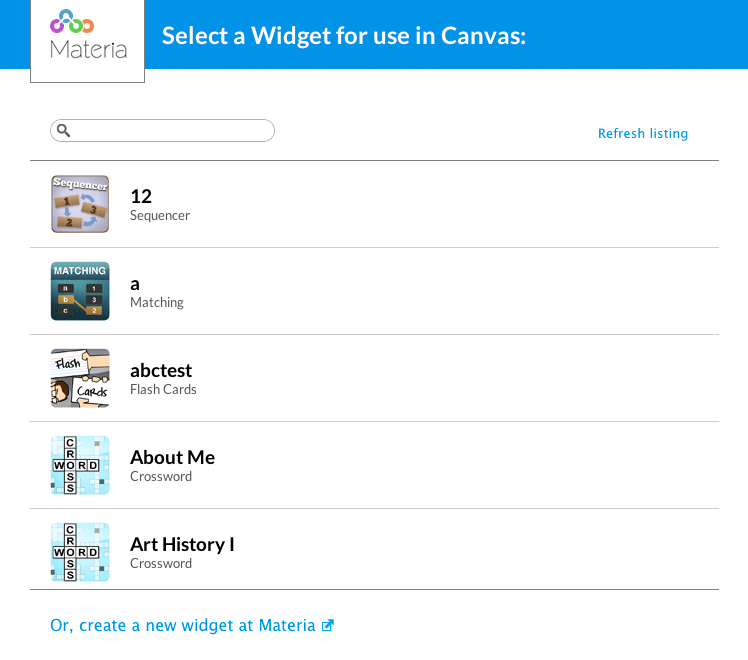
The above screen will be shown in the LMS when the instructor is choosing an assignment to embed. The instructor then needs to choose a widget to link to this LMS resource. This linking process is how Materia knows which widget to display to students, and must be completed every time Materia is used as an LTI tool. Instructors should check out the embedding widgets in Canvas guide.
The picker page emits a PostMessage event for 3rd party integration.
All assignment- or activity- related settings are then configured on the LMS side. These include:
- Attempt limits: These are completely distinct from Materia’s own attempt limits applied to widgets. Per LTI 1.3, each score submission from Materia to the LMS is counted as an assignment submission, and LMS attempt limits are applied accordingly. It is therefore possible for a student to play a widget more times than the activity’s attempt limits. Plays completed over this limit will not have their scores accepted.
- Availability windows: These are unique to the LMS and not communicated to Materia. If an availability window is applied, ensure it aligns with settings configured for the associated instance in Materia.
- Points: Materia submits a percentage value at the conclusion of a play. This is converted into a point value by LMS based on the points configured for the activity.
- Launch in a new tab: Materia widgets can be embedded in the LMS page or launched in a new tab. In both cases, LTI launches and score passback will occur without issue. The instructor is free to select their preference.
LTI Launches
Visiting a widget embedded in an assignment or module item will kick off the LTI launch process via the following sequence:
- The LMS and Materia perform the oauth2 authentication flow.
- The LMS performs a request to the LTI launch endpoint for Materia:
/ltilaunch/, with the LTI payload that includes user data, AGS data, and thetarget_link_uriwhich determines the user’s eventual destination. - Materia stores the launch data and inspects the
target_link_urito assemble a redirect URL. - The user is redirected to the URL, the launch data is recovered, and the play session is initialized.
“Recovery” Launches
What happens when a user selects “Play Again” at the conclusion of a play session, or in situations where the widget is launched in a new tab, refreshes the page? These are known as “recovery” launches:
- Materia retrieves information from the original play session via the
?tokenGET parameter that’s appended to the URL at the conclusion of the launch process. - Materia cross-checks the user from the original play with the current user. If they don’t match, the play session initialization is aborted.
- The new play session is initialized and the relevant LTI data is copied from the play session associated with the original launch, including AGS submission information.
Score Passback
When Materia detects a widget is launched as an LTI resource, it extracts information about the resource from the LTI payload and stores it in the play record. This enables the use of the Assignments & Grades Service, or AGS.
Upon completion of the play session, Materia initializes an internal AGS client using this stored information and requests an authentication token from the LMS. Once the access token is acquired, Materia attempts to submit the activity completion to the line item endpoint for the resource. The status of this submission is made visible to students on the score screen for the widget play session.
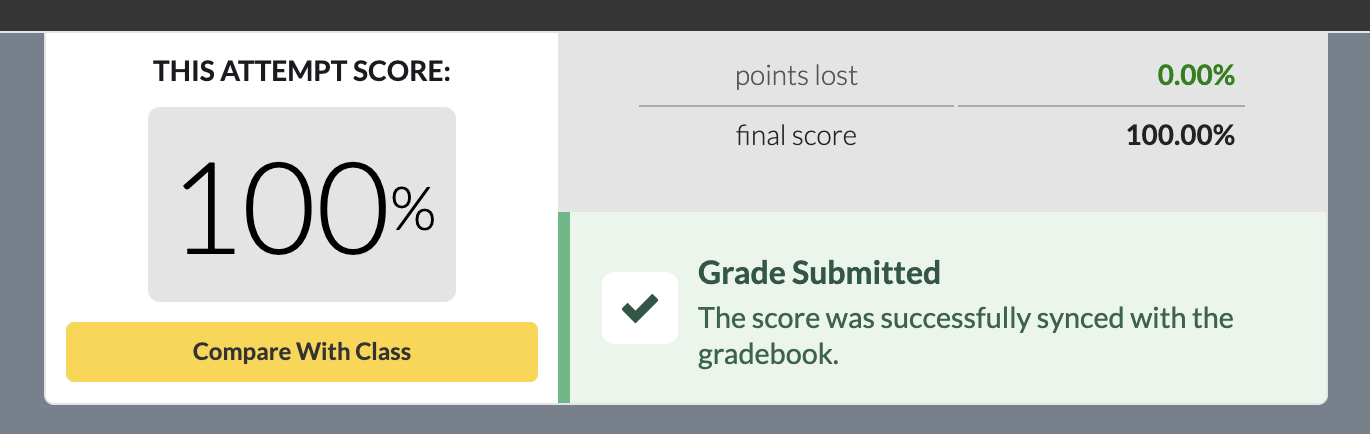
The score screen submission status will display a number of alternative status messages, based on the submission state and the associated resource. These include:
- Not Graded: If Materia detects the activity is not graded - typically because certain AGS information was omitted from the initial payload - this message will be displayed instead.
- Attempt Limit Reached: The LMS may reject the grade submission because the associated resource (an assignment, typically) does not have any remaining attempts.
- Submission Error: The submission was unsuccessful with a non-specific error. If this state occurs, the student has the ability to re-submit the score a number of times within a 24-hour period starting from completion of the play.
Reviewing Prior Submissions
Materia surfaces the type of play session - LTI or not LTI - in a number of different places visible to both students and instructors. These include:
- The Profile page: LTI play sessions will be tagged with “LTI” when a student reviews their play history.
- The Individual Scores tab in My Widgets: Individual play sessions for each student are tagged “WEB” or “LTI” based on their launch context.